
Production
See every vehicle, repair stage, assignment and blocker from one board
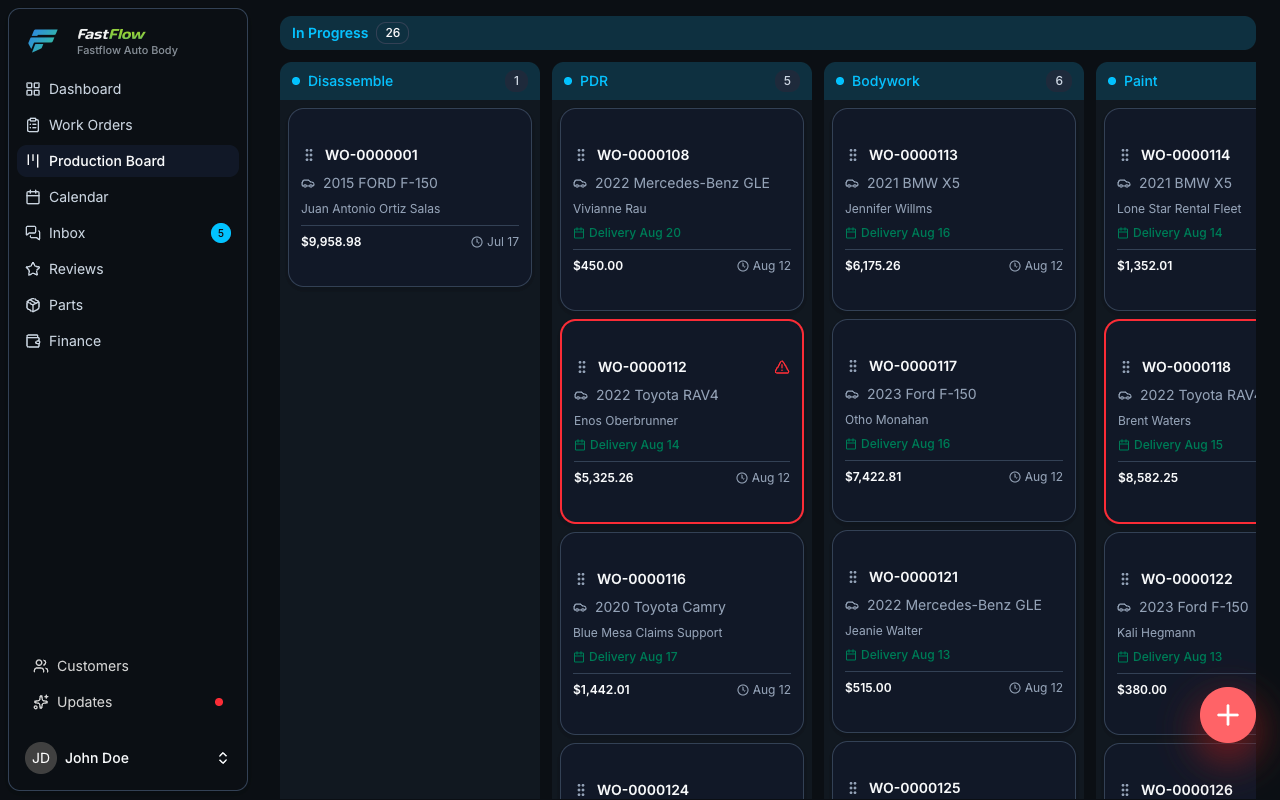
Not a status field somebody remembers to update. A live view of the whole shop, where jobs at risk surface automatically — before anyone has to go looking, and before a customer calls to ask.
Four dials, not one
A car waiting on a part is not a car waiting on a technician
Most systems collapse a repair into a single status, so the moment a job stalls you cannot tell whose problem it is — the parts desk, the technician, the adjuster or the office. FastFlow tracks four states independently, and the board reads all four.
Separating them is what makes the difference actionable. A backordered bumper is a phone call to a vendor. An unassigned job is a conversation on the floor. An unapproved supplement is a chase with the adjuster. One combined status tells you none of that.
Main
Pending, scheduled, in progress, ready for pickup, delivered, closed. Where the job is in its life, in the words the front desk uses with the customer.
Repair
Disassemble, PDR, bodywork, paint, assemble, detailing — then QC pending, failed or done. What the shop is physically doing to the vehicle right now.
Parts
Ordered, partially delivered, delivered, backordered. A backorder blocks the repair and flags the board, so the delay is attributed to the vendor rather than to your technicians.
Financial
Estimated, approved, invoiced, partially paid, paid. A finished repair and a paid repair are two different things, and the board never confuses them.
Exception-driven
Healthy jobs go quiet. Problems announce themselves.
You should not have to read the whole board to find the three vehicles that need you. FastFlow raises these conditions on its own — nobody configures a rule, and nobody has to remember to check.
Five stage columns of vehicle cards. Most cards are dimmed and unlabeled; five carry a colored edge and an exception label — no technician, parts backordered, nine days in stage, supplement pending, and QC failed.
Disassemble
- No technician
Bodywork
- Parts backordered
Paint
- 9d in stage
Assemble
- Supplement pending
Detailing
- QC failed
Fifteen of these jobs are fine and want nothing from you. Five are not. A board that shows all twenty with the same weight is a board somebody has to read carefully every single morning.
Stopped
The vehicle is not moving, and every day it sits is a day of your bay.
- Blocked
With the reason somebody typed, not a generic flag — so the next person knows what to chase.
- Parts backordered
A backorder blocks the repair, so the job stops being counted as moving.
- QC failed
It goes back before it goes out, instead of coming back after delivery.
- Loaner return overdue
Your courtesy vehicle is still out, and the job cannot close while it is.
About to stop
Still moving, but on a path that ends in a missed delivery date.
- Supplement pending
Waiting on an approval nobody is chasing. Escalates on its own once it has waited too long.
- No technician assigned
A job in progress with nobody on it. Only raised once the work should already be underway.
- 9d in stage
The vehicle nobody noticed had stopped moving, because nothing was formally wrong.
- Completion overdue
Past the delivery date you promised the customer — before they call to point it out.
- Estimate not delivered
Priced, never sent. The quietest way to lose a job you already did the work to win.
Nothing here is a report you go and run. These conditions are read off the work order the moment it changes, which is why the board is worth putting on a wall.
Screens on the floor
Two boards, two audiences, no logins
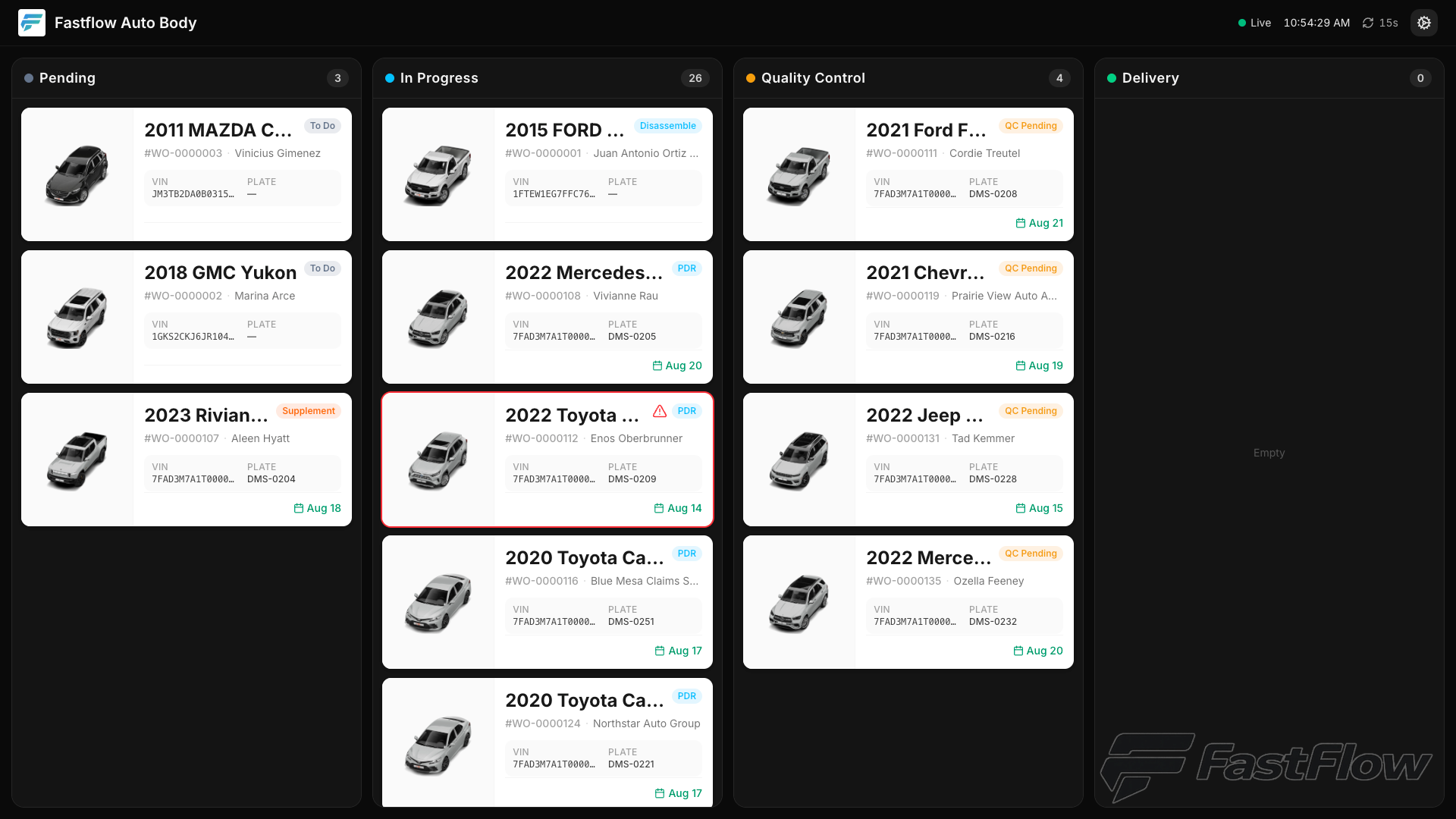
A shop TV is paired by typing a six-digit code once. There is no account and no password sitting on a screen anyone can walk up to — which is the only reason a board like this survives on a shop floor.
Front desk board
One lane per stage with the vehicle photo, so a waiting customer can find their own car. Dollar values can be hidden entirely.
Technical board
Denser: each card carries the panels, the assigned technicians, the parts state, the supplement state and the loaner state.
Refreshes without flashing
Boards update in place. Scroll position, fullscreen, density and filters survive every refresh — because a screen that resets itself is a screen nobody trusts.
Every production capability, in full
Boards, bulk stage moves, shop-floor screens, automatic alerts, technician scoping and parts — with the limits stated where they exist.
-
Production board
With limitsEvery open job in columns by repair stage or by parts stage, filterable by value, date, photos or free-text search — one screen instead of a walk around the shop.
The board is a live view of every job by stage. Status changes are made from the work order or in bulk from the list, not by dragging cards.
-
Bulk stage moves
Ten vehicles that came out of paint together are advanced to the next stage in one action, rather than opened one at a time.
-
Cards, board or list
The same job list as visual cards, stage columns, or a dense table. Your choice sticks between sessions.
-
Front desk TV board
A waiting-room screen showing every vehicle by stage with its photo, so a customer can spot their own car without asking. Dollar values can be hidden entirely.
-
Technical TV board
A shop-floor screen showing each vehicle’s panels, assigned technicians, parts state, supplement state and loaner state on one card.
-
Six-digit screen pairing
A shop TV is paired by typing a six-digit code. No account and no password sitting on a screen anyone can walk up to.
-
Automatic bottleneck alerts
The board raises what is stuck on its own — blocked jobs, backordered parts, supplements waiting too long, vehicles with no technician assigned, anything sitting too many days in one stage, overdue deliveries and overdue loaner returns. Nobody has to configure a rule, and nobody has to go looking.
-
Technician scoping
Technicians can be limited to seeing only the jobs assigned to them.
-
Parts tracking
Every part from quoted to delivered with its vendor and price — plus a cross-job view that lets you order everything you need from one vendor in a single purchase instead of three.
Watch it run on a real shop floor
30 minutes, screen shared: the board, the alerts and the TV screens on a working dataset — including what it looks like on the days everything goes wrong.