
Fleet operations
Twelve vehicles, one customer, one invoice
Fleet work breaks tools that assume one car and one owner. FastFlow treats the business customer as the unit — for intake, for visibility and for billing — so twelve vehicles are one relationship instead of twelve unrelated jobs.
The account is the customer, not the car
A fleet manager does not want to know about one vehicle. They want to know about all of theirs — which are in, which are done, what each will cost, and one bill at the end of the month. Handling that in a system built around individual repair orders means keeping a spreadsheet on the side, and the spreadsheet is always a day behind.
What carries the weight
What a fleet account actually needs
Import the whole fleet at once
Upload their vehicle list from a spreadsheet, map the columns once, review the errors before anything is written, and optionally open a work order for every vehicle in the same pass — forty units without forty rounds of data entry.
A self-service portal for the fleet manager
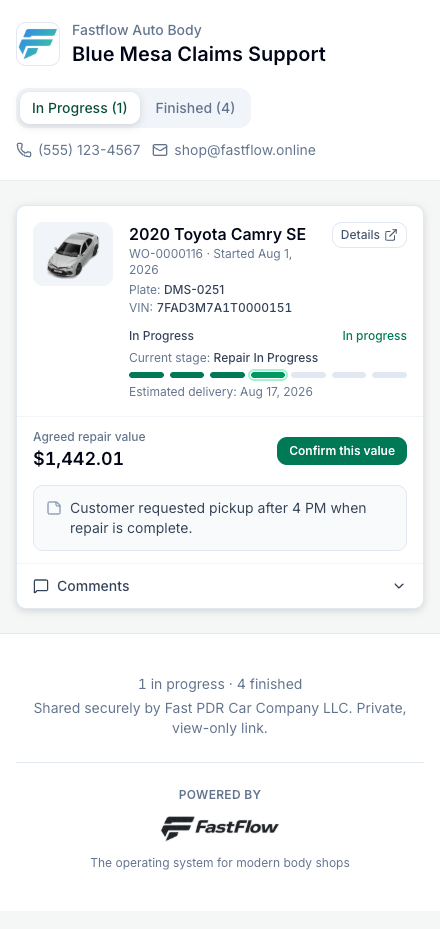
One bookmarkable link showing every one of their vehicles in your shop, with agreed values, your notes and a comment thread per vehicle. They can install it to their phone’s home screen, with your logo on it.
They confirm the value, you keep the record
The fleet manager confirms the agreed repair value themselves. Their name, the value at that moment and the timestamp are captured — and if the total later changes, FastFlow asks again rather than assuming the old answer still stands.
One invoice across many vehicles
Consolidate finished work orders onto a single numbered invoice, then apply their one payment across those jobs — oldest first, proportionally, or exactly how you decide.
Statements that close the month
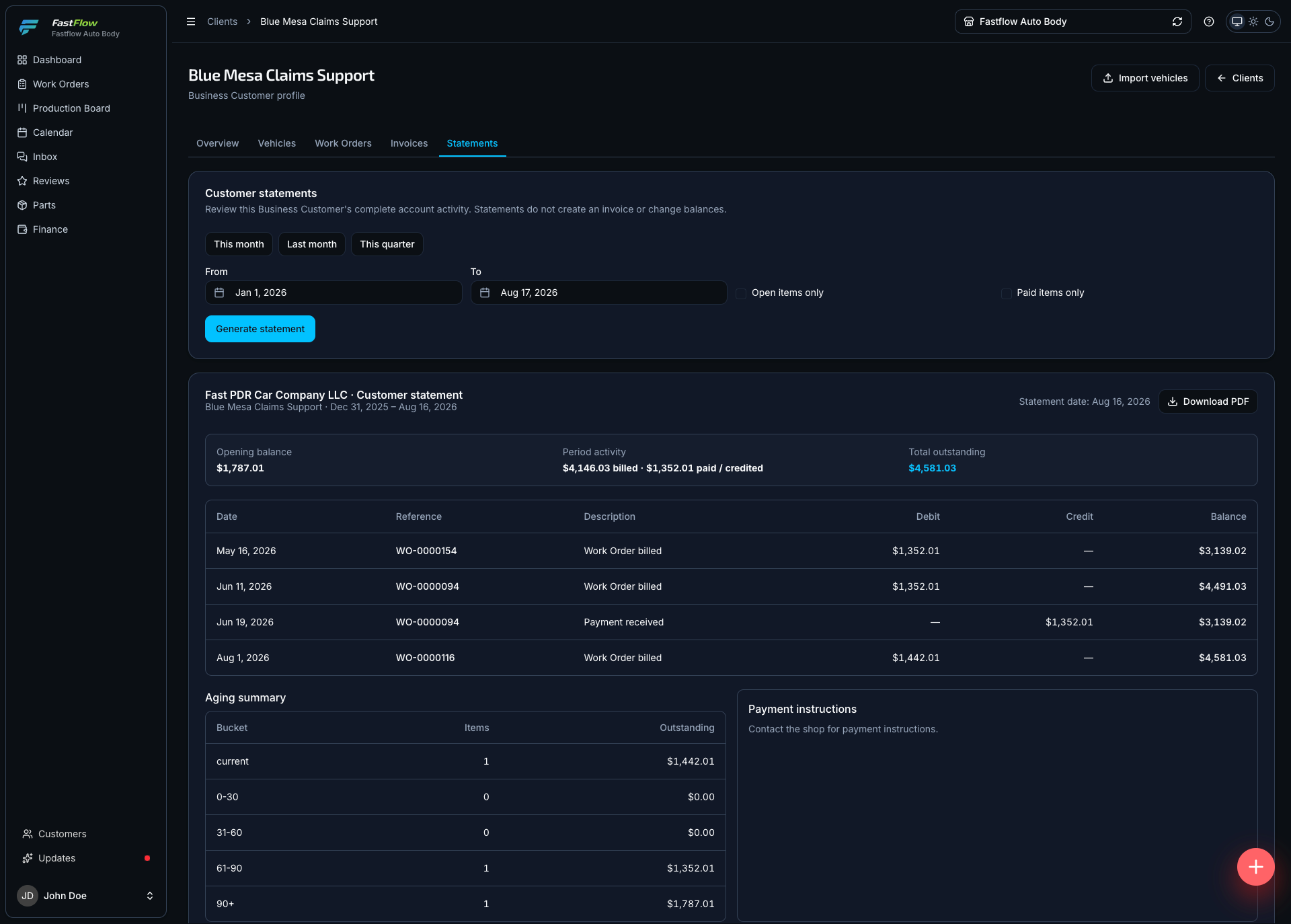
One period statement per account with opening balance, every movement and aging — built from consolidated invoices, loose work orders and standalone charges together, so the month closes in one document.
Fleet as its own performance line
Compare fleet work against insurance and customer-pay on value, duration and value per production day — so you can tell whether the account is worth the volume it takes up.
What changes for the shop
- One fleet view
- Every vehicle for the account on one screen for you, and on one link for them.
- Intake in bulk
- A spreadsheet becomes vehicles and work orders in a single reviewed pass.
- Value on record
- The manager confirms the figure themselves, captured with their name and a timestamp.
- One bill, one payment
- A consolidated invoice, one payment applied across the jobs, and a statement that closes the month.
In practice
Onboarding a new fleet account
- 1
Their forty-vehicle list arrives as a spreadsheet and is imported in one pass.
- 2
VINs are checked across the organization; any already on file for another account are surfaced rather than silently merged.
- 3
Six vehicles come in this month, each becoming a work order under the same business customer.
- 4
The fleet manager watches all six on their portal and confirms the agreed value on four of them.
- 5
At month end, all six are consolidated onto one numbered invoice.
- 6
Their single payment is applied across the six jobs, oldest first.
- 7
The statement goes out showing opening balance, the month’s activity and what is still aging.
See it running on your own numbers
30 minutes, screen shared: your workflow inside FastFlow, from intake to final payment. No slide deck.