
Communication
Every customer conversation in one place, with the repair attached
Texts, Messenger and Instagram in a single inbox — beside the vehicle, the work order and the parts status. Whoever picks up the thread already knows the answer, so nobody puts a customer on hold to go and ask the floor.
Channels
Three channels, using accounts your shop owns
FastFlow connects to your Twilio number, your Facebook Page and your Instagram account. The shop owns the number and the whole conversation history — so when a service advisor leaves, the customer relationships do not leave with their phone.
SMS
Two-way texting from a number the shop owns, with delivery status, media and the per-message cost.
Facebook Messenger
Messages to your Page land in the same inbox as everything else, assigned to a person like any other thread.
Instagram Direct
DMs to the shop’s Instagram account, threaded with the rest of that customer’s history.
Meta’s rules allow replies within 24 hours of a customer’s last message. FastFlow enforces that window rather than letting a message fail silently. Email and WhatsApp are not conversation channels today.
Templates
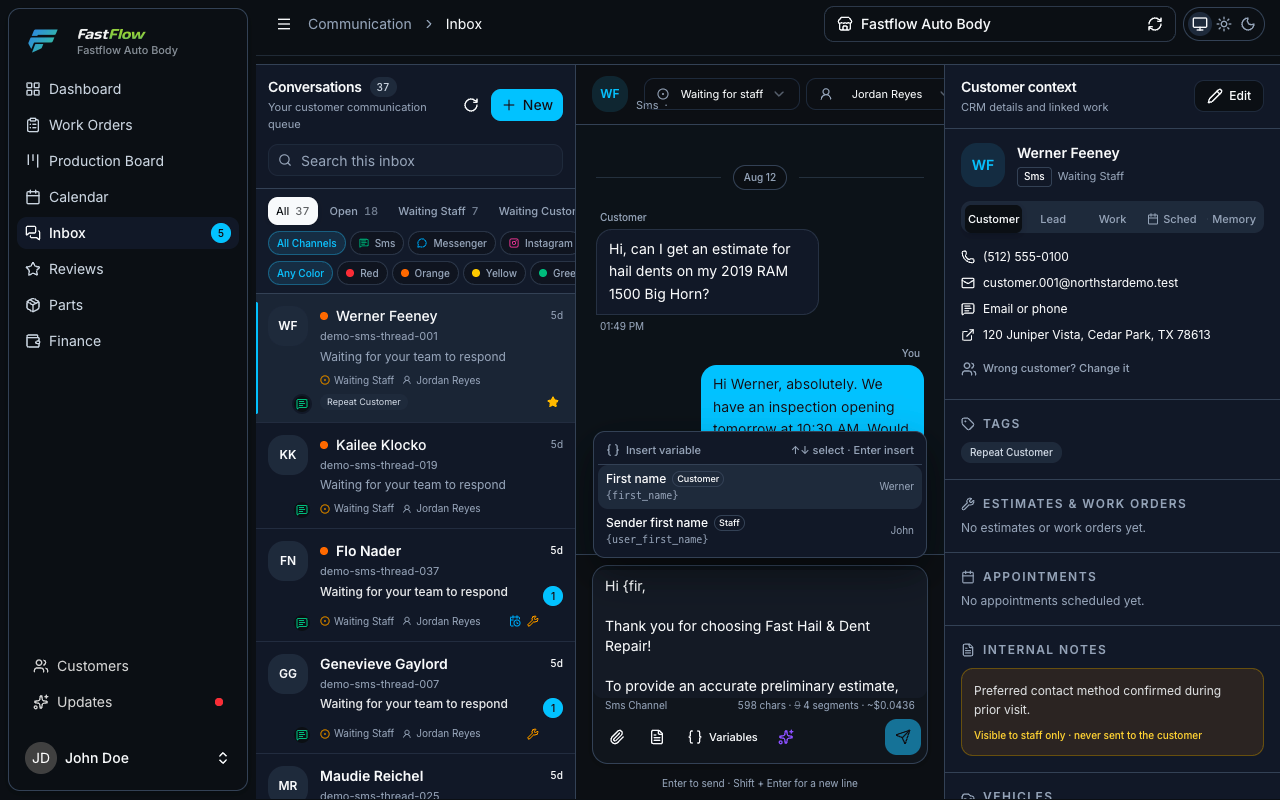
Canned messages that cannot go out broken
Around sixty variables cover the customer, the vehicle, the estimate, the work order, the appointment and the shop — including that customer’s own tracker link. Nobody retypes a delivery date.
Validated when you save
A template with an invalid placeholder is rejected when you save it — not discovered later by a
customer who received {vehicle_yaer} in a
text from your shop.
Blocked when unresolved
If a variable has nothing to fill it with on this particular job, the send is stopped. The composer shows you which ones resolved before you press send.
Priced before you send
Long messages split into segments, and segments cost money. The composer shows the segment count and the cost of the draft as you type it.
AI assistance
AI that understands the repair, not just the conversation
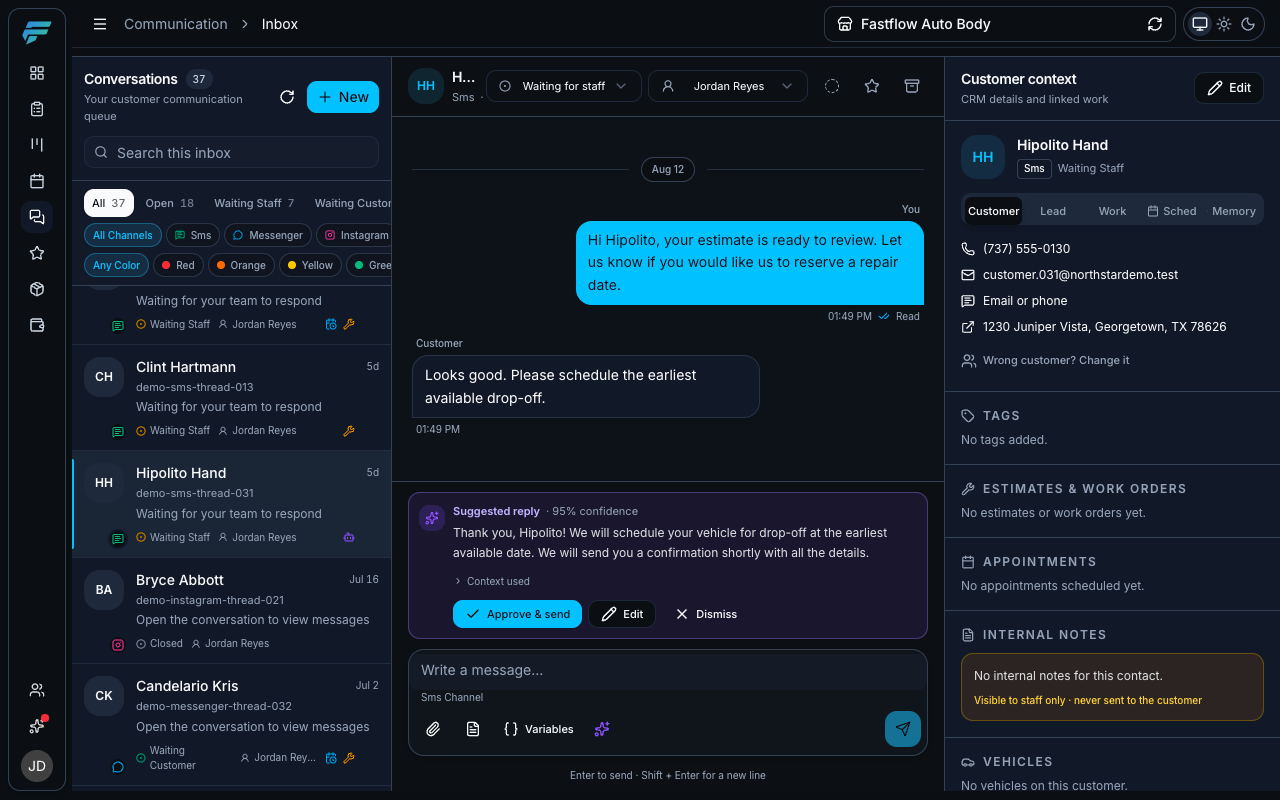
A generic assistant writes a polite sentence. This one can say the bumper is backordered and the new delivery date is Thursday, because it read the work order. And it never sends anything by itself.
The difference is not the model. It is that the assistant lives beside the operational record instead of guessing from the last few messages.
Built from your data
The last twenty messages, plus the vehicle, the work order status, the parts state, the reason the job is blocked and the scheduled delivery date — the same facts a good advisor would look up first.
Approved by a person
Approve, edit or discard. Approving is its own permission, so you can let someone reply to customers without letting them send AI drafts.
Shows what it used
Every draft lists the records and memories it was built from, so whoever approves it can check the claim against the work order rather than trusting the tone.
Remembers what matters
A language preference, an agreed inspection time. Staff can pin, correct or erase everything remembered about a customer. Optional, and off until you connect it.
Defers to your records
When something remembered contradicts your work order, it is withheld from the draft entirely and the topic is flagged. The assistant never argues with your system of record.
Your account, your key
Connect your own AI provider account. You control the key, and you can turn the whole thing off.
Every communication capability, in full
Channels, assignment and ownership, templates, merge variables, attachments, message costs and Google review replies.
-
Unified inbox
Needs setupSMS, Facebook Messenger and Instagram Direct arrive in the same three-pane inbox, with the customer’s vehicle and work order beside the thread.
Requires connecting your own Twilio number and, for Meta channels, your Facebook Page and Instagram account.
-
Assignment, status and ownership
Each thread has an owner, one of five states, and a visible history of who changed what and when.
-
Message templates
Reusable replies across seven categories. A template with an invalid placeholder is rejected when you save it, so a customer never receives a half-filled message.
-
Dynamic template variables
Merge the customer’s vehicle, estimate total or portal link into a message. Around sixty variables, and the send is blocked if any placeholder has nothing to fill it with.
-
Attachments
Customer damage photos are stored with the conversation and downloadable individually or as a single ZIP.
-
Unread indicators
With limitsSidebar, browser tab and installed-app badges show what is still waiting on a reply.
Badge counts only — FastFlow does not send phone push notifications.
-
SMS cost tracking
Every message records its segments, encoding and cost, and the composer prices a draft as you type it — so texting volume never becomes a surprise line on a carrier bill.
-
Google review replies
Needs setupPull in Google Business Profile reviews and publish replies, with templates and alerts for new or low-rated reviews.
Requires connecting your Google Business Profile account.
Every AI capability, and its guardrail
What the assistant drafts, what it reads first, what it refuses to say, and the approval step it can never skip.
-
AI reply suggestions
Drafts a reply from the last twenty messages plus verified record data: the vehicle, the work order status, the parts state, the reason it is blocked, the scheduled delivery date.
-
Mandatory human approval
A suggestion is never sent on its own. Someone approves, edits or discards it — and approving requires its own permission, separate from the permission to reply.
-
Context disclosure
Every draft shows exactly which records and memories it was built from, before anyone approves it.
-
Conversation memory
Needs setupRemembers durable facts — a language preference, an agreed inspection time — so the shop stops re-asking questions the customer already answered. Staff can pin, correct, or erase everything remembered about a customer.
Optional. Requires connecting a Mem0 instance; off by default.
-
Contradictions are withheld, not guessed
When a remembered fact conflicts with verified record data, it is withheld from the draft entirely and only the topic is flagged — so the assistant never argues with your own system of record.
-
Opening-message drafts
Drafts a first outbound message from a short brief, in English, Spanish or Portuguese.
-
Review reply drafts
Drafts a public Google review response in the reviewer’s language and your shop’s tone. It is barred from revealing claim details, admitting liability, or offering discounts unless you ask it to.
See the inbox on a live conversation
30 minutes, screen shared: one thread end to end — template, merge variables, an AI draft awaiting approval, and what happens when the customer replies at 9pm.